Epic Coding Bro
Steps
- Connect and read the AES-ECB encrypted flag’s hex, splitting it into 16‑byte blocks.
- Note which blocks correspond to known characters fsuCTF{ } and mark them.
- For each unknown block index:
- Open a new connection (same AES key within that session).
- Re‑read the flag blocks and extract the target block.
- At the prompt, send one candidate character.
- Compare its 16‑byte ciphertext to the target block.
- When they match, record the character and move to the next position.
- Repeat until all flag characters are recovered.
Detailed Explanation (Including Screenshots)
I am given a server that gives an encrypted flag and the opportunity to encrypt one more character. After entering another character, it gives the encryption and closes the connection.

Every connection uses a different hash, so you cannot just reconnect and build a dictionary of the letter’s hashes:

We are also given a python file that contains the source code for the problem:
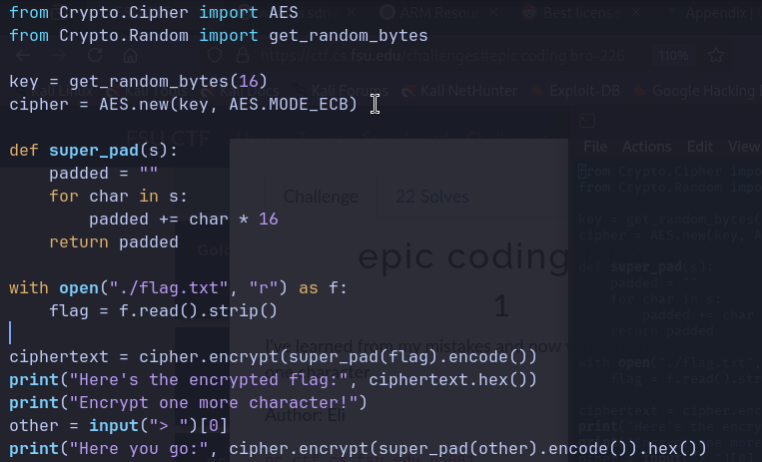
It uses AES ECB for encryption and a super_pad() function that takes the flag from flag.txt, strips it, applies super_pad(), and prints the hex of its AES‑ECB encryption.
The vulnerability here is that AES-ECB encrypts 16-byte blocks separately and deterministically. If two plaintext blocks are identical, their ciphertext blocks will be identical. Because super_pad() repeats each char 16 times, each char of the flag becomes its own 16-byte plaintext block:
You can obtain the encryption of any single character under the same key once per connection, so within that connection you know the ciphertext of one block of the form c=AES_ECB(char*16)
Putting this together, each ciphertext block of the flag equals the encryption of 16 copies of a single flag character. If you can query the service for the encryption of the same character, you can match blocks and recover the flag.
Here is what I did to exploit this vulnerability:
Open a connection to the server. Read and parse the encrypted flag, extract the 16 byte block corresponding to the target position. We know the flag contains fsuCTF{ and }, so we can skip the query for those and move onto the next. wait for the “Encrypt one more character!” prompt, then:
- Loop over all printable ASCII
- Send one character
- Read its single-block ciphertext
- Compare it against the target block
- If they match, we have found the right character
- If they don’t match, close connection and try again
I made a python script that uses pwntools to automate this:
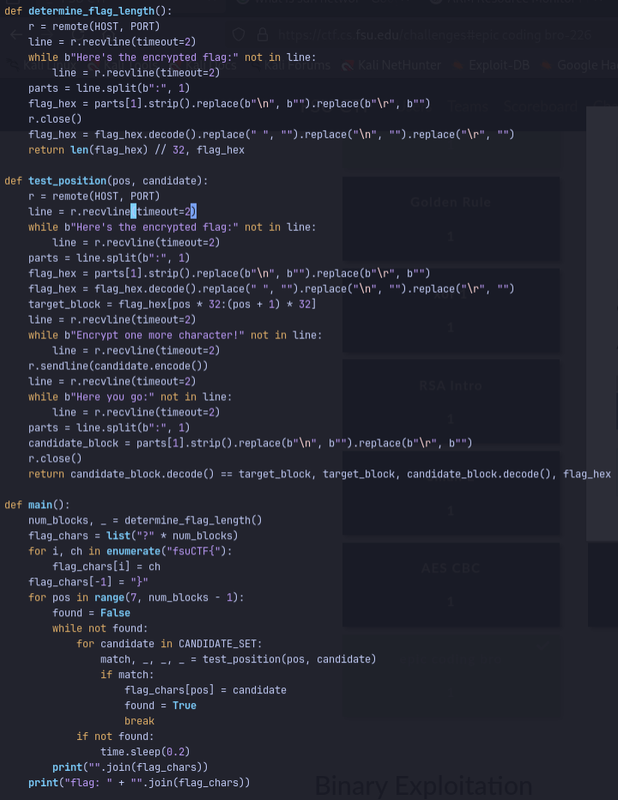
I ran this with the server IP and port, and was yielded this result:
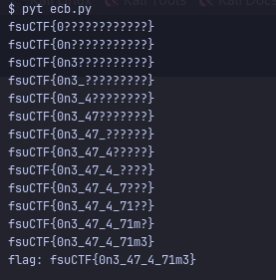
The flag is: fsuCTF{0n3_47_4_71m3} I submitted and verified the flag